Showing posts with label automatic. Show all posts

Tuesday, March 22, 2016

Excel FINANCE Tip : Connect Excel to Stock Historical Data

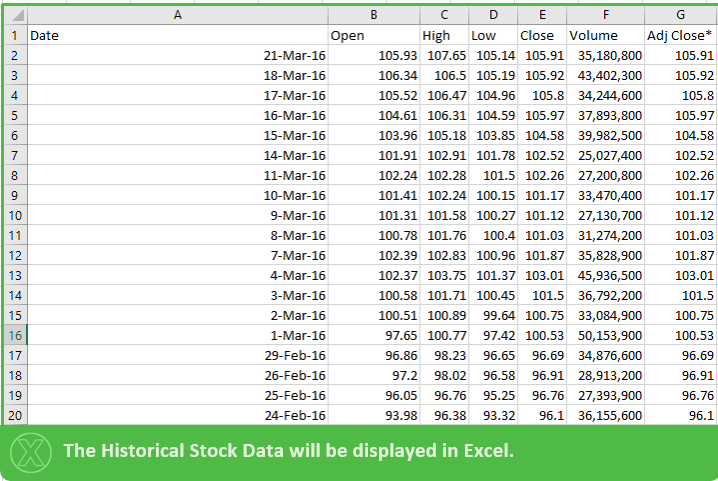
If you wish to connect your Excel file to Live or Historical Stock Data please follow the instructions below.


After Opening a new Excel Workbook:


The "New Web Query" Excel Browser will open as below:


Search the Stock in the address bar as shown below:


A Start Date  and End Date for the Historical Data can be selected above.( Click on "Get Prices" Afterwards). TIP: If date is left far in the future Excel will always have the latest data when the connection is refreshed.

After Step 4) just Click IMPORT and proceed to the step below:


The Data Connection can always be refrehes by clicking on the "Refresh All" button as below:


Thank you for your attention!


Created by DoMyExcel.com © | Excel & VBA Consulting | Customized Excel Solutions starting at 89 USD

Services provided to Individuals and Businesses | Free Quote: DoMyExcel@gmail.com
Do My Excel Website

Thursday, March 10, 2016

Example: Add ON EXCEL to create and export custom pictures

Take a look at this EXCEL Add on we created in order to easily apply custom format, caption and other elements to pictures and to export them:


Created by DoMyExcel.com © | Excel & VBA Consulting | Customized Excel Solutions starting at 29 USD
Services provided to Individuals and Businesses | Free Quote: DoMyExcel@gmail.com

Saturday, January 10, 2015

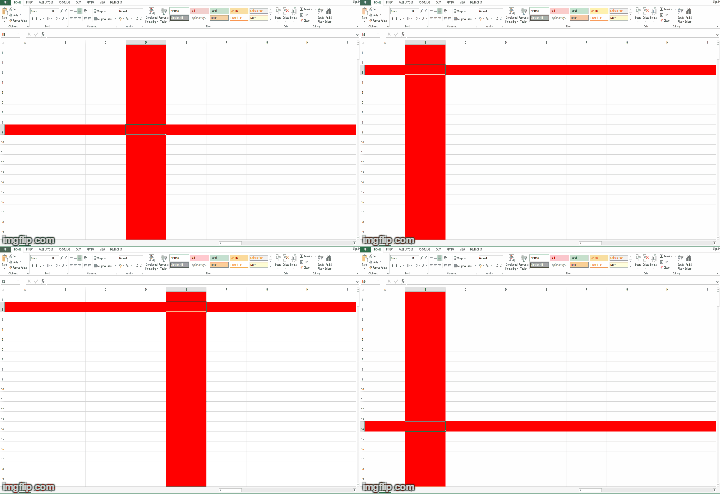
How to highlight the row and column of a selected cell in Excel using a VBA macro

To color in red the current row and column of a selected cell, enter following code in the worksheet event "SelectionChange":

Private Sub Worksheet_SelectionChange(ByVal Target As Range)
Cells.Interior.ColorIndex = 0
Rows(Target.Row).Interior.ColorIndex = 3
Columns(Target.Column).Interior.ColorIndex = 3
End Sub


Created by DoMyExcel.com © | Excel & VBA Consulting | Customized Excel Solutions starting at 29 USD
Services provided to Individuals and Businesses | Free Quote: DoMyExcel@gmail.com