
Since EXCEL 2007, there is a function called "Slicer" that permits to have a better user experience when it comes to filtering data in a pivot table.
Example on below pivot table:

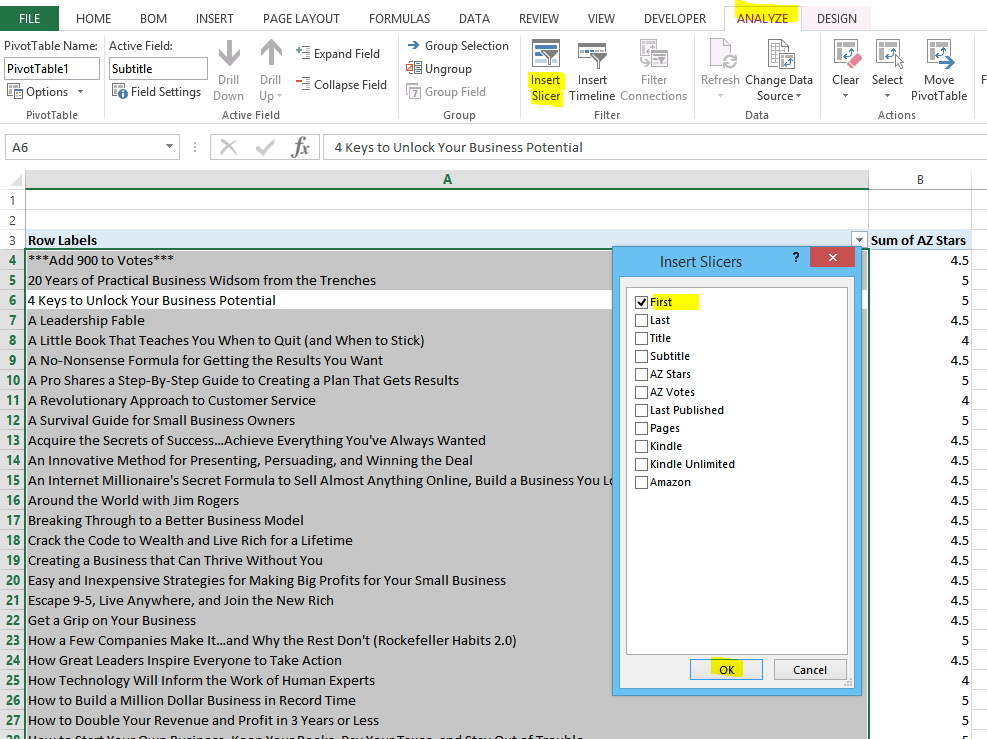
Instead of putting another entry in the "Filters" section of the pivot table, select the pivot table and press "Insert Slicer" in the "Analyze" tab. Then check out the field you want to filter:

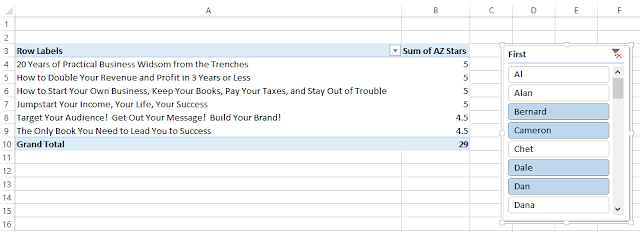
As a result you will have a user friendly menu where you can easily search for the name you want to filter and select multiple entry to sort out at once:
Example on below pivot table:

Instead of putting another entry in the "Filters" section of the pivot table, select the pivot table and press "Insert Slicer" in the "Analyze" tab. Then check out the field you want to filter:

Created by DoMyExcel.com © | Excel & VBA Consulting | Customized Excel Solutions starting at 29 USD


